Pages

Showing posts with label connecting through social media. Show all posts

Wednesday, 31 January 2018

Staying Connected to the Pages You “Like”

Facebook has once again changed the algorithms that determine what shows up in your news feed. The gurus have decided that if one of your posts sparks a debate and gets lots of comments then you must want to see more of that. So the algorithms will be pushing posts from your friends and family to the forefront of your news feed and the pages that you like will be pushed down on the list.

The change has been, once again, to regulate the big corporations that use free Facebook feeds as an advertising avenue. So companies, corporations etc will be way down in your postings. Facebook doesn’t want you spending lots of time on shopping sites, travel sites etc. They want you to like the free stuff from friends and family. In many ways this feels like a return to the mundane and mindlessness that was once Facebook. But you can still have control over what pops up in your feed. Here’s how:

From your home page, go to the top right corner and look for the little down arrow next to the big ? mark in a circle:


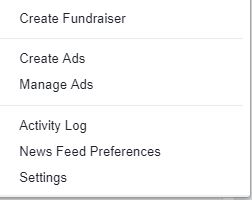
Click on the arrow and scroll toward the bottom of the drop down menu to the line that says “News Feed Preferences”


Click on that line and at that top of the page that opens you will see “Prioritize who to see first” 


Click on that and everyone and everything you follow. Simply click on the things you want showing up in your newsfeed then click the blue box that says “DONE”   

Tuesday, 1 October 2013

Using Google+ For Genealogy

Google+ is Google’s social platform. It rolled out in 2011. It started in Beta, of course, and was by invitation only. I was fortunate enough to be given an invitation and have to say I LOVED what I found. Google+ seemed to be far more intelligent than Facebook. Of course that was primarily because of the Beta testing and also because of the way I had (have) set it up. I only use Google+ to connect with fellow genealogists. I connected with 250 of them in the first two months! 250!  

Here’s the how-to: 

You need a Google account, of course. If you have Gmail, then you already have a Google account. I love Google because of its simplicity, so the one sign in for all things Google is ideal for me.  

Once you have your account set up, you can start finding people that have similar interests. To do this, use the Google search bar at the top of the home page. Type in “genealogy” then add those people to your circles.  

Circles are groupings of people. You can group people into similar interest groups.
Genealogy, photography, writers, horse lovers, whatever you choose. No one can see what your circles are called, so make them user friendly for yourself.  

The Google+ settings are more privacy friendly than Facebook. I can decide for each post who sees the information. I can choose to leave some people out (like my employer). Now you are ready to start posting. The nice thing about the genealogy piece is that most people use the Google+ platform to link to their blog posts, announce training they are running, webinars that are upcoming, and other things that are generally of interest. When you create a post, you choose at the bottom of the post WHO you are going to share the information with. If you want to speak with someone privately, just type their name in there rather than the name of the circle. This will still show up in your “stream” (the equivalent of a Facebook news feed) so you don’t have to go looking for the private conversation under some other tab or column. Do yourself a favour and DON’T check the box that offers for you to also share by e-mail since that essentially spams the same group of people. They will pick up your post in their stream. They don’t need it again in their already full inbox.  

Google+ also has video-conferencing built in. These are called hangouts. They are really cool. I remember when this was first launched there was a record for the longest on air hangout. It went on for nearly 50 days! Hangouts are a great way to connect when people are co-presenting a webinar, organizing a conference or sharing family tree info on the same ancestors. The maximum number that can be in on a video hangout at one time is limited to 10. But the nice thing is it is free. And it has better connectivity, with less down time, than Skype. If you don’t use the video part, you can have up to 100 people. Free! 

Since Google discontinued the use of Google Reader, the idea is for people to join Google+ and read blogs from the posts that are entered there. Google has also changed the way the page is laid out and it is now a double column screen. I personally find this more distracting making it harder to concentrate on one post at a time. My genealogy circle is now over 1200. Who would have thought?  

Google+ is a great way to connect with other genealogists, to share ideas in more than 140 characters and without the ideas getting lost in Facebook drivel. Give it a try. Find me, circle me, add me to your genealogy circle. Make sure that you have "genealogy" in your profile and I will add you to my genealogy circle as well!
Thursday, 5 September 2013

Using Twitter for Genealogy

The first question might be “just what is Twitter anyway?” Well, simply put, Twitter is a social media venue that allows access to instant information. The information is shared in small bursts of conversation known as tweets. These tweets are limited to 140 characters in length. A message that is Short and Sweet. That’s a tweet.  

Twitter is a great way to get information on newly released genealogy records, connecting with genealogists  all over the world, discovering new resources (who is digitizing records and making them available, who is creating new research facilities, who is holding conferences or workshops.). Twitter can be a valuable resource to genealogists of any calibre.

Here’s how you can get started: 

First, you need to create an account. To do this, go to the Twitter website: http://twitter.com  Here you will find the sign up box. You will be required to enter your full name, email address, and to create a password. Once done, hit the “sign up for twitter” button. Next, select a username. Choose something that is unique to you and that will make it easy for others to identify you. Mine is @genealogytours because my business arranges genealogy tours to Scotland. ALL Twitter usernames have the @ symbol at the beginning.
 
Finally, click the “create my account” button. Once you have done that, Twitter will send you a confirmation email. When you receive that, click on the link in the body of the e-mail to confirm your that you really did want to sign up. You will be re-directed to Twitter.   

From here, you can begin to “follow” tweeters who might be of interest to you as you research your family history. You can do this in the search bar at the top of your homepage. Simply type in the things you are looking for “Scottish genealogy”, “England genealogy”, “Irish Genealogy”, “Welsh genealogy” etc. You can also look for people you think might be able to provide information that will be helpful to you as you research. Type in their names and a list will be generated. You do not need to know their Twitter user name for this part. Twitter will show them via their first names. Once you find who you are looking for, click on their user name, and once on their homepage, you can choose to “follow” them. This means that any tweets they issue will be automatically shown in your stream on your homepage. You can follow as many people as you want. If you are more interested in learning than in communicating, you don’t ever have to tweet. The real benefit of Twitter lies in being able to access real-time information that matters to you.

You can follow conversations by reading through your stream or by clicking on the “view conversation” link at the bottom of a tweet that has been replied to. If “view conversation” does not show, there is no conversation to follow. Like Facebook, you can upload pictures. On Twitter, they will show as a weblink. One picture is usually sufficient and unlike Facebook, pictures are used to punctuate a point, not to share the fun at the party you attended on the weekend. 

One of the buzz words associated with Twitter and that is now starting to show up on Facebook is “hashtag” No, its not an illicit drug, but rather a way of tracking topics. If you use a hashtag (#) in front of an acronym or phrase,  in the search bar, you can then follow all conversations to do with that topic. This is a nice way of weeding out other, less relevant information. This is particularly helpful if you want to follow along on “as it happens” events like the airing of new #WDYTYA episodes. It is also how news reporters are able to give up-to-the-second reports on such issues as the #bostonbomber or the #ohio kidnapping case.

Happy Tweeting!